It seems all I do any more is migrate things that used to “run” at my house to externally hosted services.
After @glarizza mentioned octopress to me and subsequently posted an article on it, I was hooked (mlk holiday helped as well). I had screwed around with wordpress for a while but spent more time securing it then posting to it. This solution allows me to use all the tools that I am using day to day (git + github,vim + markdown), and also has a decent syntax highlighting engine.
I still have quite a few things at my house to administer but luckily between google apps and github pages my little Hak Nam on the web should be a more stable then an old G4 in my office with a record count of 6 dead RAID members over the years could ever be.
Using Augeas With Facter
I recently needed to demo how to use augeas with facter. This needs to be optimised to not just be Augeas::NONE but this allows you to have augeas parse the file rather then ruby.
Confine a Dynamic Fact Using Facter
While in training this week, a coworker was trying to figure out how to confine a fact using a another fact when using facter.
This is quite easy using confine in the Facter.add block however when you add dynamic facts in the mix , that block is always executed after you wanted it confined.
For instance if you have some yum based fact that dynamically generates many more facts and wanted to confine it only to RedHat, you can simply do the following:
Example NSStatusItem
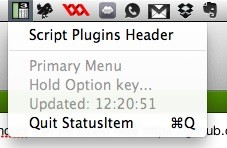
I created a sample NSStatusItem Application for my presentation at Mac Tech Conference - 2011 It can be found here
Documentation for MacSysAdmin 2012
Documentation is now available from my two sessions at MacSysAdmin 2012.
Server AD Migration and Integration Video
Server AD Migration and Integration Slides
Workstation AD Migration and integration Video
The Cocoa wrapper tool I built can be found here:
Download Winnebago
Simple Little Warranty Parser
if anyone is interested I have a python prototype of @glarriza’s warranty ruby script that spits all keys out as a dict I would have used his but I am writing something in python that needed this directly and I did not want to call an external command.
I really should be parsing here but I was in a hurry.
System-Type an IOReg POC CLI
I just posted a little command line here
This little binary will tell you if you have a Laptop or Desktop. It reads this value using the system-type in IOKit (IOPlatformExpertDevice). You can parse this value your self using the ioreg (-l) command but Its not formatted well, so I decided to make this as its a pretty common request. For instance I once had a school district that wanted to turn off wireless on all Desktops as they were having MYNAME(37) bonjour name conflict issues.
There is a little example.command shell script to show you the two ways you would use this in your scripts. laptops are value 2 (exit 1) and Desktops are value 1 (exit 0). The exit values allow you to use standard logic built-in to run the command and use its exit value. Or if you think thats lame you can parse the text. To each there own but I like exit values
Known Issues: As I recall this does not cover PowerPC machines, but I have not seen an intel that does not use this value. Maybe iPad 3 will be 3 ;)
To Do: I will make a little installer for it as some point and put it in /usr/local/bin/system-type Could use some options as well such as controlling behaviour Maybe XML output, and put some other values?
European Macintosh System Administrators Meeting 2011

Well its official , I will be speaking at the European Macintosh System Administrators Meeting 2011 in Göteborg, Sweden. Check out the details here.
Fun With Schlage Link and Python
So I have a Schlage LiNK Wireless Keypad Entry Lever Lock Starter Kit System. I am trying to take the whole thing apart call by call but until I am ready to post that I wanted a quick easy way to interface with the system in a semi cool way. Basically I wanted anyone who types the code in the door to hear “Welcome home” $First $last. So I decided that I could at least in the time being before I figure out Zwaves command classes, just check my email (Special notification Inbox) and parse the name from there. This works pretty well, I mark it as read so I don’t see it the second time around and then set it on a launchd job. Though really you could use this to run any command based on a special subject line, so its a quick easy example of something sorta cool. I have not had a chance to make a youtube video of it, but I will when its a little more sexy ( and I get the arduino hooked up to the metal skull servos, yes I am totally not joking that I have a metal skull that I am teaching to speak).
Fun With Deploy Studio and Python
While thinking about my previous post , I wrote a quick example on how to interact with another plist formatted transactional system: Deploy Studio. Today we were running into an issue with using some post renaming scripts that DeployStudio did not know about. So ideally I just wanted to make sure that as names of machines changed , deploy studio was notified for an subseqent restores that took place. To accomplish this I took a look at the Post Methods aviable in DP and was able to get the whole proof of concept built without calling any external commands. I am going to probobly add quite a bit to this (such as pushing ARD fields ) but here is my proof of concept.